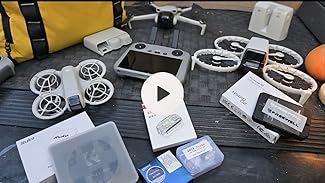
Ready to protect your DJI RC Controller’s screen in less time than it takes to brew your morning coffee? I’ve got you covered. Here’s how to install that screen protector in under two minutes flat. No magic tricks, just a straightforward approach that leaves your screen squeaky clean and protected.
Why Use a Screen Protector?
Let’s face it, our beloved gadgets deserve a little pampering and protection from scratches, dust, and the ominous threat of clumsy hands. The DJI Controller Matte Glass Screen Protector is specifically designed to keep your controller’s screen looking brand new without breaking a sweat.
Steps to Install the Screen Protector
Here’s the quick and easy way to install your screen protector:
- Step 1: Clean your screen thoroughly. A lint-free cloth should do the trick, eliminating any fingerprints or dust.
- Step 2: Align the screen protector with the edges of your DJI RC Controller. Take a deep breath; precision is key!
- Step 3: Carefully place the protector on the screen, pressing from the center outwards to avoid air bubbles.
- Step 4: Give the screen a final wipe down to ensure it’s clear and ready to roll.
And there you have it! You’ve safeguarded your controller’s screen while saving precious minutes for more exciting activities like flying your drone or planning your next adventure.
Check Out Our Gear
Curious about the gear that keeps us running smoothly? Here’s a peek:
- Samsung – Galaxy A71: Capturing all the action with quality photos.
- Adobe Software: Our go-to for top-notch editing.
- DJI Mini 3 with “Fly More” Combo Set: For those breath-taking aerial shots.
- Dell Laptop: Our reliable partner in crime.
- Sceptre Curved 30″ Monitor: Making editing a breeze with its wide display.
- TCL Phone: Keeping us connected across social media.
- UBeesize Selfie Ring Light with Tripod: The perfect touch for our video shoots.
- Godox 2 Pack Wireless Lavalier Microphones: Crisp audio for clear communication.
- Xerox Color Laser Printer: Bringing our digital creations to life.
Additional Links
Support our projects at Gear Websites or explore everything on our Patreon.
Explore our Amazon shop for more gear here.
Thanks for your support!
For more engaging content, don’t forget to follow us across social media, including Instagram and Twitter.